Every writer knows the feeling. You are deep in a draft, the words are flowing, and then you need to pull in a quote you found earlier. You switch to your browser, scroll through tabs, find the article, copy the passage — and by the time you return to your document, the thread of your argument has slipped away. That interruption cost you more than a few seconds. Research shows it takes an average of 23 minutes and 15 seconds to fully regain focus after switching contexts.
This is the invisible tax that writers pay dozens of times per day. Whether you are a journalist piecing together interview transcripts, a blogger weaving in statistics from multiple sources, or a novelist shuffling scenes between chapters, the core problem is the same: writing requires pulling together fragments from many places, and your operating system's single-slot clipboard was never designed for that job.
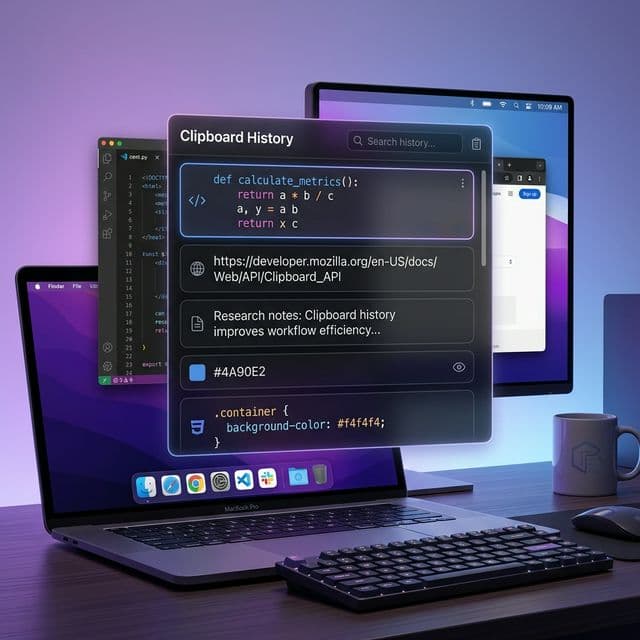
A clipboard manager changes the equation entirely. Instead of a single fragile slot that gets overwritten every time you press Cmd+C, you get a searchable, persistent history of everything you have copied — text, URLs, images, rich formatting and all. It is a small tool that addresses a massive source of friction in the writing process.
The Three Phases Where Writers Lose Time
To understand why a clipboard manager matters, it helps to break the writing workflow into its three major phases: research, drafting, and editing. Each phase involves a different pattern of copying and pasting, and each suffers from its own set of frustrations when you are limited to a single clipboard slot.
Phase 1: Research — Collecting the Raw Material
Good writing starts long before you type your first sentence. The research phase is about gathering — pulling quotes from articles, saving statistics from reports, bookmarking URLs, and capturing fragments of ideas from a dozen different sources. For many writers, this is where the most time disappears.
Consider the typical research session. You open ten browser tabs, a PDF, and maybe a Slack thread with notes from a colleague. You read through each source, copying the relevant passages one at a time. But here is the problem: every time you copy a new passage, the previous one vanishes from your clipboard. So you are forced into a tedious loop — copy from a source, switch to your notes document, paste, switch back, find your place, copy the next passage, switch again, paste again.
Studies show that the average person loses 20% to 40% of their productive time simply from switching between tasks and applications. For writers doing research, this means that the mechanical act of moving information between windows can consume nearly half of a work session — time that should be spent reading, analyzing, and thinking.
With a clipboard manager, the research phase becomes dramatically simpler. You can copy passage after passage without worrying about losing anything. Every quote, every URL, every statistic is automatically saved to your clipboard history. When you are ready to write, you open the clipboard manager, search for what you need, and paste it directly. No tab switching. No re-finding sources. No lost quotes.
This is especially powerful for journalists and academic writers who need to track where each piece of information came from. Because a clipboard manager like Recopy preserves URL tracking alongside your copied text, you can always trace a quote back to its original source — a feature that saves time during fact-checking and citation.
Phase 2: Drafting — Assembling the Puzzle
If research is about gathering raw material, drafting is about assembly. You are building an argument, telling a story, or explaining a concept — and you need to pull in references, data, and quoted material as you go. This is where writers typically do the most copying and pasting, and where a single-slot clipboard causes the most pain.
“Writing is not so much about producing words as it is about organizing ideas. The better your system for gathering and retrieving material, the more time you spend on the work that actually matters — thinking clearly and writing well.
Picture a content marketer writing a data-driven blog post. The draft needs to include four statistics from different industry reports, two expert quotes, a code snippet for a tutorial section, and links to three related articles. Without a clipboard manager, each of those twelve items requires a separate round-trip to the source — find it, copy it, switch windows, paste it, go back. With a clipboard manager, all twelve items are already sitting in your history from the research phase. You search, select, and paste without ever leaving your writing environment.
Preserving Rich Text and Formatting
One detail that matters more than most writers expect is rich text support. When you copy a passage from a web article or a formatted document, you often want to preserve the original formatting — bold text, italics, links, headings. A plain-text clipboard strips all of that away, forcing you to either reformat manually or go back to the source to copy it again.
Recopy captures and preserves rich text, HTML, and plain text simultaneously. When you paste, you can choose whether to keep the original formatting or strip it down to clean plain text. For writers who move content between Google Docs, WordPress, email, and markdown editors, this flexibility eliminates an entire category of formatting headaches.
The Nonlinear Nature of Writing
Writing is rarely linear. You might draft your conclusion before your introduction, or realize mid-paragraph that a point you made earlier belongs in a different section. This kind of rearranging — cutting a paragraph from one place and pasting it somewhere else — is fundamental to good writing. But it becomes risky with a single clipboard. If you cut a paragraph and then accidentally copy something else before pasting, your carefully crafted text is gone.
A clipboard history acts as a safety net. Even if you accidentally overwrite your clipboard, your previously copied text is still there, searchable and retrievable. For writers who work in long-form — essays, reports, book chapters — this safety net is invaluable.
Phase 3: Editing — Refining Across Documents
The editing phase often involves moving text between multiple documents: pulling feedback from an editor's comments, incorporating revisions from a collaborator's draft, or consolidating notes from a review session. If you have ever tried to merge two versions of a document by hand, you know how tedious the copy-paste cycle becomes.
Clipboard managers streamline this process by letting you copy multiple pieces of text in quick succession and then paste them in whatever order you need. Instead of switching back and forth between two documents for each individual change, you can batch your copies — grab five or six revisions from the editor's document — and then switch to your draft and paste them one by one from your clipboard history.
When incorporating edits from a reviewer, try this workflow: first, read through all their comments and copy each suggested change one after another. Then switch to your draft and use your clipboard history to paste each revision exactly where it belongs. This reduces window switches from dozens to just two — one to read and copy, one to apply and paste.
This batch-copy approach is particularly effective for writers who work with editors or co-authors. Instead of constantly switching between the feedback document and your working draft, you stay focused on one task at a time — first understanding the feedback, then applying it. This respects the way our brains actually work, minimizing the cognitive overhead of context switching.
Search: The Feature Writers Do Not Know They Need
Most writers do not think of search as a clipboard feature. But once you have a history of hundreds or thousands of copied items, the ability to search through them becomes transformative. Need that statistic you copied last Tuesday? Search for it by keyword. Looking for a URL you grabbed from a research session? Type a fragment of the domain name.
Recopy's search works across all content types — plain text, rich text, URLs, code snippets, and more. It is essentially a personal knowledge base built from everything you have ever found worth copying. For writers who work on recurring topics, this turns the clipboard manager into a living reference library. A technology journalist covering AI, for example, might search their clipboard history for "transformer" and find every relevant quote, statistic, and URL they have copied over the past month.
Practical Workflows for Different Types of Writers
Bloggers and Content Marketers
Content marketers often need to produce data-driven posts quickly. A typical workflow might involve gathering statistics from five or six industry reports, pulling quotes from expert interviews, and linking to related content. With a clipboard manager, the research phase becomes a rapid-fire copying session — copy every relevant data point without pausing to paste. Then open your editor and assemble the draft using search to find each piece exactly when you need it.
Journalists and Researchers
Journalists live in the space between sources and stories. A single article might draw on court documents, press releases, interview transcripts, and social media posts. Keeping track of where each quote came from is critical. A clipboard manager with URL tracking provides an automatic audit trail — every copied passage carries metadata about when and where it was captured, making fact-checking faster and more reliable.
Technical Writers and Documentation Authors
Technical writers frequently copy code snippets, terminal output, API responses, and configuration examples into their documentation. A clipboard manager that preserves formatting and handles code blocks cleanly — without mangling indentation or stripping syntax — makes this work substantially easier. Instead of keeping a separate scratch file for code samples, every snippet you copy is preserved and searchable in your clipboard history.
Novelists and Long-Form Writers
Novel writing involves constant rearrangement — moving scenes, shifting dialogue, and pulling in notes from character sheets or worldbuilding documents. A clipboard history gives long-form writers the freedom to cut and move text without fear of losing it. It also serves as an informal revision log, letting you revisit earlier versions of passages you have since rewritten.
Beyond Copy and Paste: Building a Writing System
The real power of a clipboard manager is not any single feature. It is the way it removes friction from the mechanical parts of writing so you can focus on the intellectual parts. Every time you do not have to switch windows to re-find a source, every time you do not lose a quote because you accidentally copied over it, every time you search your history instead of digging through browser tabs — that is time and mental energy redirected toward actually writing.
Writing productivity is often discussed in terms of word counts and time blocks, but the writers who produce consistently good work tend to focus on something different: reducing the gap between having an idea and getting it onto the page. A clipboard manager shrinks that gap by ensuring that the raw material of your writing — the quotes, the data, the references, the fragments of inspiration — is always within reach.
“The best writing tools are the ones that disappear into your workflow. You should not have to think about how to get information from one place to another — it should just be there when you need it.
Getting Started: Small Changes, Big Results
If you have never used a clipboard manager, the learning curve is almost nonexistent. You keep copying and pasting exactly as you always have — the only difference is that nothing disappears. Your clipboard history builds itself automatically in the background. Within a day or two, you will find yourself reaching for it instinctively: searching for something you copied yesterday, pasting an item from three copies ago, or reviewing your clipboard history to remember where you left off in a research session.
Recopy is built specifically for macOS and sits quietly in your menu bar, accessible with a keyboard shortcut whenever you need it. It captures plain text, rich text, HTML, URLs, images, code, and more — covering every content type a writer encounters. Its search is instant, its history is persistent, and it respects your formatting so you spend less time cleaning up pastes and more time writing.
The writers who get the most out of a clipboard manager are the ones who stop thinking of copy-paste as a one-shot action and start treating it as a continuous stream. Copy liberally during research. Paste precisely during drafting. Search freely during editing. Once your clipboard has a memory, your writing workflow will never feel the same.
Ready to eliminate clipboard friction from your writing workflow? Try Recopy — a fast, native clipboard manager for macOS designed for people who work with words, code, and ideas every day.